First, allow me to set the mood with some suitable (but extremely stereotypical) background music.
With some very mixed emotions, I have made the tough decision to leave the Operations team at DataSift in the middle of September. I started working here in January of this year, and I have enjoyed it immensely. The team is fantastic: they are very intelligent people tackling some extraordinary real-time problems on a huge scale. The work has been challenging, but so much fun. Everyone has always been extremely supportive and helpful, and ready to offer suggestions or advice.
Despite my short time here, I really feel that I have accomplished something that will make (and has already made) a real difference to the day-to-day work of the developers and the operations team. I’m just sorry that I won’t be able to see the project to the later stages.
Let me say here and now that I didn’t go searching for this new opportunity. It is the only offer that could have possibly pulled me away, and it came from nowhere. I’m not leaving lightly, and I would strongly recommend working at DataSift to everyone I know.
So, what�is�the reason for this bittersweet change?
A while ago, I noticed that a lot of the social JavaScript plugins (Facebook, Google+, Twitter buttons) use pretty much the same code. I decided this was wasteful, so I refactored the common code into a tiny snippet. Now all you need to do is add the JavaScript code below to your page inside a <script> tag, and choose which social widgets you want to include.
The iptables tool is wonderful, especially if you’re suddenly getting a lot of traffic that you don’t want. Recently, I’ve been seeing a message in the logs, warning “ip_conntrack: table full, dropping packet.”
“WTF? How can the connection tracking table be full? I’m not using connection tracking…”
It turns out that rules that use the “match” plugin and check a connection’s state start tracking that connection, just in case you ever want to match against ESTABLISHED or RELATED states. Let me explain with an example.
A few days ago, I gave a talk at PHP London about using OAuth with PHP. I started out building it in OpenOffice, but quickly found the process annoying, especially considering that I wanted to export to PDF with progressive disclosure on some slides. After putting the skeleton of the talk together, I decided to move to something else instead.
I’ve had some experience with the LaTeX document typesetting system before, having used it quite a lot during university for my final project‘s reports and presentation. I used the beamer package before, but this time I found its styles too restrictive. The three major presentation packages that I’m aware of are prosper (which I believe is quite old now),�beamer, and powerdot. After some investigation (looking primarily at features and visual styles), I settled for powerdot. I will explain the basics of putting a presentation together in the rest of this post, but be warned: it assumes some basic familiarity with LaTeX, and I don’t explain everything! Continue reading →
Time for a quick micro-post, I think. I feel like sharing two useful fragments of my git configuration.
First up, aliases. I have a few useful shortcuts defined, as well as some nice ways of displaying a repository’s history. I’ve aliased many of the common commands to two-letter versions which evoke the similar Subversion command aliases:
[alias]

� st = status

  di = diff

  co = checkout

  ci = commit

  br = branch

  sta = stash

� graph = log --decorate --oneline --graph --branches --date-order

� lg = log --graph --pretty=format:'%C(yellow)%h%Creset -%C(yellow)%d%Creset %s %C(green)(%cr)%Creset %Cred<%an>%Creset' --abbrev-commit --date=relative --date-order

  today = !git log --author=$(git config user.email) --since=yesterday
The scenario is that you have used git-svn to import an SVN repository, and you want to make use of the already-imported commits elsewhere. Unfortunately, git clone does not (currently) clone the git-svn information. It looks like we have to fully rebuild the git-svn repository, which would then mean pulling every commit from the Subversion server once again. What we’d really like to do is to make use of history we already have from git. Continue reading →
I recently became curious about creating some edit-in-place controls: things that look like static text until you click them, and they magically become editable. It turns out that creating this sort of thing is almost trivial with jQuery, which is now my favourite JavaScript framework. I’m a big fan of functional-style programming, and jQuery plays right into that.
It was still surprising that the bulk of what I wanted to do can be done in about 16 lines of code. That’s right: sixteen.
Note: This is a fairly rambling explanation of recent events. I assume that you have at least a passing knowledge of LVM and its terminology. This was written to prove that it is possible to recover from pvmove failing (in certain cases) due to the way it performs its operations and backs up metadata. Continue reading →
Many hearing aids can handle direct audio input (DAI), often via a “shoe” that attaches to contacts on the aid itself. This shoe then provides a DAI jack (sometimes called a europlug or eurojack) that cables can be plugged into.
There seems to be a complete lack of cables designed for people with a single hearing aid, so one of my upcoming projects will be to convert a Y-cable that can serve two hearing aids into a joint DAI/earphone cable instead.
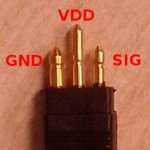
DAI connector pinout
The DAI connector has the following pinout:
short/thick pin: ground
long/thin pin: VDD (apparently — doesn’t seem to actually be connected to anything on a 3.5mm cable)
short/thin pin: signal
Remember that a standard 3.5mm audio plug has the following pinout:
tip: left signal
inner sheath: right signal
outer sheath: ground
Next stage: connecting an earphone to the plug on one side of the cable, to see if there are any impedance issues, although the cable I am using (an fmGenie one) is a very low-impedance cable because I have an Oticon hearing aid. Measured with a multimeter, it seems to be around 0?, so I think that’s good enough for me. I believe attenuated cables have a 330k? resistor in series with each signal line (according to Neil Ferguson’s bluetooth hearing aid hack page).
My ultimate goal is to get hold of a DAI jack that I can solder directly to an old earphone, so that I can just plug the spare DAI cable into the earphone directly, almost as if it were a hearing aid itself. Unfortunately, it seems that it is impossible to get hold of such things. According to Connevans, DAI jacks are only custom-made for hearing aid shoes. After some discussion, it seems like I should be able to make one myself though (with some help!) so we shall have to see how that turns out.
I’ve been thinking recently about Insight again, and I’ve been considering part of the problem with naming and uniqueness.
Names in a traditional file system are made unique based on a full path to the file, but most people think of a file name as just the final component. This would then cause a problem with the move to Insight, as a file could appear in multiple directories, and its only distinguishing feature would be the final component of its path. This is counter-intuitive and can cause all sorts of problems.
Consider makefiles, for example. They rely on a standard named file (Makefile) appearing at various levels in the hierarchy in order to work. Obviously, you would want different makefiles at different levels and in different projects, but Insight as it stands has no way to handle this.
I then started thinking about what makes a file unique. In the end, I came up with two things: name and content. This covers the makefile case (same name, different content) as well as the backup case (same content, different name). It then occurred to me that, in the general case, all you need to distinguish a file is its content, and then actually finding it can all be left up to metadata.